
Best Gaming Mice for FPS Games 2026: Top 5 Pro-Tested Picks
In competitive FPS — CS2, Valorant, Apex Legends, Warzone — your mouse is the single most impactful piece of hardware on your desk. It translates every micro-adjustment and snap flick directly into crosshair movement. The wrong mouse fights you; the right one disappears. We've analyzed pro usage data, tested sensor performance, and cross-referenced the picks that show up on tournament desks. Here are the five best FPS mice for 2026, from $40 budget wireless to the $159 setup that dominates pro lobbies.
Pro Usage Stat: Over 80% of CS2 professional players use mice weighing under 80 grams. The Logitech G Pro X Superlight 2 and Razer Viper V2 Pro together account for nearly half of all pro desk setups tracked in 2025–2026.
| Rank | Mouse | Price | Weight | Best For |
|---|---|---|---|---|
| 🥇 #1 Overall | Logitech G Pro X Superlight 2 | ~$159 | 61g | Pro-grade competitive FPS |
| 💰 Budget Ultralight | Razer DeathAdder V3 | ~$69 | 59g | Best wired ultralight under $70 |
| 🔌 Pro Wired | Zowie EC2-C | ~$79 | 73g | Plug-and-play, zero software |
| 📡 Best Wireless <$150 | Razer Viper V2 Pro | ~$149 | 58g | Lightest wireless FPS mouse |
| 💵 Budget Wireless | Logitech G305 | ~$40 | 99g | Wireless FPS on a budget |
Jump to a Section
1. Best Overall FPS Mouse — Logitech G Pro X Superlight 2
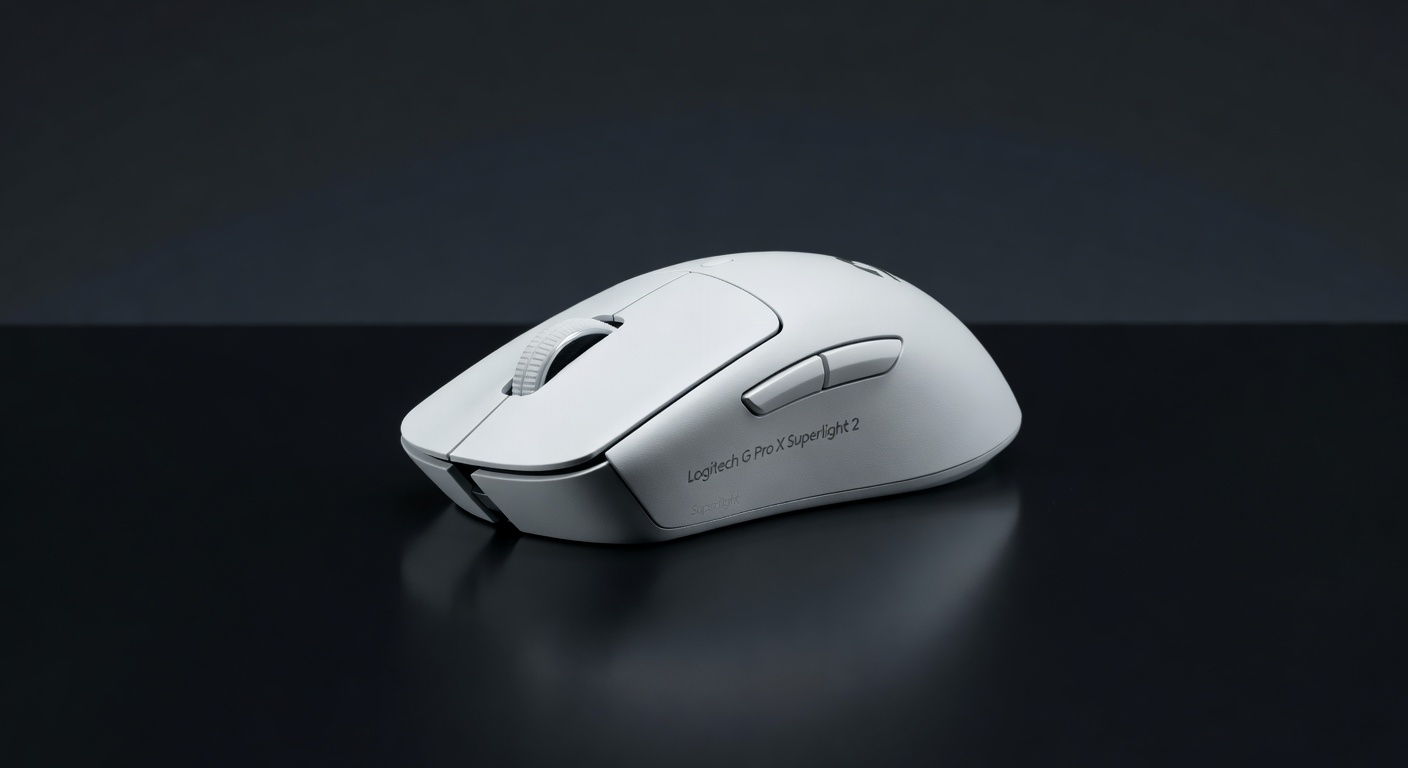
There is no honest list of the best FPS mice in 2026 that doesn't have the Superlight 2 at the top. It weighs 61 grams without a single hole in the shell — no honeycomb compromise, just a tight, solid body that feels precise and premium. The Hero 2 sensor is accurate at any speed and reports up to 4000Hz via LIGHTSPEED wireless, the fastest polling rate in a consumer mouse. There are no side buttons to accidentally trigger during tense firefights, no RGB to distract, no software required beyond initial setup. Logitech built this for one purpose and it shows. Pro players across CS2, Valorant, and Apex use it in competition because it genuinely performs.
Pros
- Used by actual pro tournament players
- 4000Hz LIGHTSPEED — fastest polling available
- 61g with no honeycomb cuts
- Zero button bloat — no accidental inputs
- 70-hour battery life on LIGHTSPEED
Cons
- $159 is a premium price
- Right-handed shape only
- No extra side buttons (by design)
- No RGB (intentional, not a flaw)
Verdict: The definitive FPS mouse. If you play competitive shooters seriously and can stretch to $159, buy this. Nothing beats it for the combination of weight, sensor accuracy, wireless latency, and pro pedigree.
⚖ Compare: G Pro X Superlight 2 vs Razer DeathAdder V3 → 🛒 Check Price on Amazon2. Best Budget Ultralight FPS Mouse — Razer DeathAdder V3

At 59 grams — lighter than the Superlight 2 — the DeathAdder V3 is one of the lightest mainstream FPS mice you can buy, and it achieves that without punching holes in the shell. Razer's Focus Pro 30K sensor is identical to what you'll find in mice costing twice as much. The optical switches eliminate all debounce delay, which matters when you're spamming clicks in close-range fights. The reshaped DeathAdder form factor is more aggressive than previous generations, optimized for claw and fingertip grip — the two most common grips among FPS players. At $69 wired, the value is exceptional.
Pros
- 59g — lighter than most premium options
- Focus Pro 30K sensor — pro tier accuracy
- Optical switches with zero debounce delay
- Solid shell, no honeycomb debris trap
- Best wired ultralight under $70
Cons
- Wired only (wireless V3 Pro costs more)
- Right-handed shape only
- Razer Synapse software is clunky
Verdict: The best FPS mouse under $100, full stop. If you can't justify $159 for the Superlight 2, the DeathAdder V3 gets you to the same sensor quality and lighter weight for $69 wired. The cable is the only real compromise.
⚖ Compare: DeathAdder V3 vs G Pro X Superlight 2 → 🛒 Check Price on Amazon3. Best Pro Wired Option — Zowie EC2-C

Zowie is the brand that doesn't play the spec war game. The EC2-C ships with a PixArt 3360 sensor that is tournament-proven and flawless, zero-installation required — plug it in and play. No software, no firmware updates, no accounts, no RGB distractions. DPI is set via a button on the underside. Polling rate switches between 125/500/1000Hz via a physical toggle. At 73 grams it's slightly heavier than the ultralight competition, but Zowie's build quality is dense and deliberate — this mouse feels like a tool, not a toy. The right-handed ergonomic shape is one of the most copied in competitive FPS history.
Pros
- Truly plug-and-play — no software ever
- PixArt 3360: flawless tournament sensor
- Legendary ergonomic shape
- DPI and polling set by hardware switches
- Built to last — no gimmicks
Cons
- 73g — heavier than ultralight alternatives
- No wireless option
- Older 3360 sensor (still excellent, not newest)
- Right-handed only
Verdict: The anti-hype pick. If you hate software, hate bloat, and want a mouse that just works at a LAN or tournament, the EC2-C is what you want. Still trusted by CS2 pros who've used Zowie for a decade.
🛒 Check Price on Amazon4. Best Wireless FPS Mouse Under $150 — Razer Viper V2 Pro

At 58 grams, the Viper V2 Pro is the lightest wireless FPS mouse on this list — lighter than the Superlight 2 by 3 grams. Razer's HyperSpeed wireless clocks in at 4000Hz polling via a USB-C dongle, and the Focus Pro 30K sensor is the same class-leading optical sensor used in the DeathAdder V3. The ambidextrous shape is wide and flat, making it work well for both claw and fingertip grippers. The Viper V2 Pro ships with no RGB — a deliberate choice to hit the 58g target. For $10 less than the Superlight 2, you get a fractionally lighter mouse with comparable wireless tech and the same sensor family.
Pros
- 58g — lightest wireless FPS mouse here
- HyperSpeed 4000Hz wireless polling
- Focus Pro 30K — top-tier sensor
- Ambidextrous shape (left-handed friendly)
- $10 less than the Superlight 2
Cons
- Battery life shorter than Superlight 2 (~70hr vs ~80hr)
- Razer Synapse required for advanced config
- USB-C dongle adds desk clutter
- Ambidextrous shape not ideal for all palm grips
Verdict: If the Superlight 2 is sold out or you prefer an ambidextrous shape, the Viper V2 Pro is the wireless FPS pick at $149. Same sensor class, lighter body, slightly different ergonomic trade-offs.
🛒 Check Price on Amazon5. Best Budget Wireless FPS Mouse — Logitech G305

The G305 is the answer to "how do I get wireless for FPS gaming without spending $100+?" At $40 it runs Logitech's LIGHTSPEED wireless — the same technology (at 1000Hz) used in mice costing four times as much. The HERO 25K sensor is accurate and well above what anyone needs for FPS play. Battery life is extraordinary: 250 hours on a single AA battery means you will never mid-session charge. At 99g it's noticeably heavier than the ultralight options here, but for a $40 wireless mouse with pro-tier latency, that's a reasonable trade.
Pros
- LIGHTSPEED wireless at $40 — incredible value
- 250-hour battery on AA (never dies mid-game)
- HERO 25K sensor — accurate and efficient
- Works on all surfaces
- Logitech G HUB software (optional)
Cons
- 99g — heaviest mouse on this list
- 1000Hz max (no 4000Hz like premium picks)
- Side buttons left-side only
- No charging — requires AA battery
Verdict: The G305 proves you don't need $150 to get real wireless performance. The 99g weight is the only genuine limitation for competitive FPS — if you can live with it (many players can), this is one of the best value gaming peripherals ever made.
⚖ Compare: G305 vs G Pro X Superlight 2 → 🛒 Check Price on AmazonWhat Makes a Good FPS Mouse?
Weight: Why Under 80g Matters
FPS games demand rapid crosshair repositioning — wide flicks, micro-adjustments, tracking fast targets. Heavy mice (90g+) create more inertia that your wrist has to overcome on every movement. After a 3-hour session, that fatigue compounds. Under 80g is the pro threshold; under 70g is the ultralight sweet spot. The 58–73g range on this list covers what the world's best FPS players actually use. Going lighter than 55g starts to feel insubstantial for some players — there's a floor as well as a ceiling.
Sensor: What to Look For
Any mouse with a PixArt 3360, 3395, or Logitech HERO 2 sensor is operating at the limit of what the technology can offer — no mouse on this list will "slow down" your aim due to sensor limitations. The sensor differences between premium mice are academic. What actually varies at the consumer level is implementation: lift-off distance, smoothing, angle snapping (avoid any mouse with this enabled by default), and LOD calibration. The sensors on all five picks here are clean with no software tricks required.
Polling Rate: 1000Hz vs 4000Hz
See the polling rate explainer below for a full breakdown. Short version: 1000Hz is fine for most players. 4000Hz is meaningful at 360Hz+ displays, but imperceptible at 144Hz. Don't choose your mouse primarily on polling rate.
Shape: Match Your Grip
Claw grip (arched fingers, partial palm contact): medium-width right-handed or ambidextrous shapes work best — DeathAdder V3, Superlight 2, Viper V2 Pro. Fingertip grip (only fingertips touch the mouse): lighter and flatter shapes — Viper V2 Pro's flat ambidextrous body is ideal. Palm grip (full hand on mouse): larger, more contoured mice like the EC2-C cover the hand better. Trying to use a shape built for a different grip causes fatigue and inconsistency — this matters more than most players expect.
Wired vs Wireless for Competitive FPS
Modern wireless from Logitech (LIGHTSPEED) and Razer (HyperSpeed) achieves polling rates and latency identical to wired connections. Pro players who used to swear by wired have steadily moved to wireless over 2023–2026 as the technology matured. The only remaining advantage of wired is zero battery anxiety and slightly lower cost at the same performance tier. Cable drag from a stiff cable is a real disadvantage that good wireless eliminates entirely.
Polling Rate Explained: 1000Hz vs 4000Hz — Does It Actually Matter?
Polling rate is how often your mouse reports its position to your PC. At 1000Hz (standard), that's every 1 millisecond. At 4000Hz (Superlight 2, Viper V2 Pro), that's every 0.25 milliseconds — four position updates for every one at 1000Hz.
In theory, more frequent updates means smoother, more accurate cursor tracking. In practice, the advantage depends entirely on your monitor refresh rate. At 60Hz or 144Hz, your screen can only show a new frame every 6.9ms or 6.9ms — far slower than either polling rate. The position data from 4000Hz updates simply queues between frames. The perceived difference at 144Hz is effectively zero.
At 240Hz or 360Hz, your screen refreshes every 4.2ms and 2.8ms respectively. At 360Hz, each frame now lands between two 4000Hz polling cycles — and you can genuinely benefit from the extra position data. 4000Hz starts to matter at 240Hz+ with a player sensitive enough to detect it.
Our verdict: if you're on a 144Hz monitor (the majority of players), don't factor polling rate into your decision. If you're on 240Hz+ and compete seriously, 4000Hz is a legitimate marginal upgrade — but still the smallest variable in your aim improvement equation.
More Gaming Gear Guides
- Best Mouse for Valorant 2026 — game-specific picks with pro settings →
- Best Gaming Mouse 2026 (All Budgets) →
- Best Gaming Headsets 2026 →
- Best Gear for Competitive FPS (Full Setup) →
- FPS Calculator — See What Your Rig Can Handle →